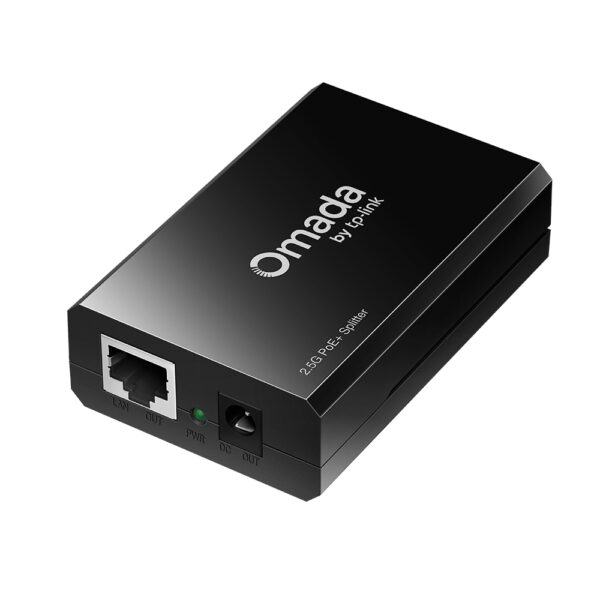
PoE Adapters

Filters

About PoE Adapters.

PoE adapters (injectors) add Power over Ethernet to a network that does not have a PoE switch. One adapter sits between the switch and the device and sends both data and power down a single cable to an IP camera, an access point or a VoIP phone.

This is the cheapest way to install one or two devices where there is no socket — a camera above a door, an access point on a ceiling — without replacing the whole switch. Splitters do the opposite: they take a PoE line and separate it back into data and power for a device that has no PoE input of its own.

Match the standard to the device (PoE 802.3af, PoE+ 802.3at, PoE++ 802.3bt) and check the wattage. Tell us the model you need to power and we will pick the right adapter. We are the official TP-Link partner in Azerbaijan.

How to choose a PoE switch — for cameras and access points

A PoE switch carries both data and power over the same network cable. That means no separate mains socket for a camera or an access point — one cable is enough for a ceiling, a pole or a facade mount. Four things decide the choice: port count, PoE standard, total PoE budget and whether the switch is managed.

1. PoE standards — where most mistakes happen

  • 802.3af (PoE) — 15.4 W per port. Enough for an ordinary indoor camera and a simple access point.
  • 802.3at (PoE+) — 30 W. Outdoor cameras with heaters, PTZ cameras, high-power access points.
  • 802.3bt (PoE++) — 60–90 W. Cameras with floodlights, multi-antenna Wi-Fi 7 access points.

The rule is simple: the standard a device requires must also be on the switch. A camera that needs PoE+ will either not start at all on a plain af port, or will cut out when the night floodlight turns on.

2. Total PoE budget

This is not the power of each port on its own, but the total the switch can deliver across all ports together. If an 8-port switch has a 60 W budget, it cannot give 30 W to every port. The calculation: add up the draw of all devices and add 25–30% headroom — for future expansion and for heaters running in winter.

3. Which series is right for you

SeriesExample modelsManagementBest for
Omada ES (unmanaged)ES205GP, ES208GP, ES210GPPlug and play4–8 cameras, a small office — no configuration needed
Omada ES (more ports)ES216G, ES224G, ES228GPPlug and playMid-size site, higher port count
Smart (TL-SG2000)TL-SG2008P, TL-SG2210P, TL-SG2428PWeb interface, VLANWhen the network must be split (guests, cameras, office kept apart)
Managed L2+ (TL-SG3000)TL-SG3428MP, TL-SG3452P, TL-SG3428XMPFull management, routingLarge site, many VLANs, aggregation point
Multi-GigabitES210X-M2, TL-SG3210XHP-M2Model dependentWi-Fi 7 access points — a 1 Gbps port is no longer enough
IndustrialIES208GDIN rail, wide temperature rangeProduction floors, cabinets, outdoor conditions

4. Port count and uplink

Do not fill every port: for 8 cameras do not buy an 8-port switch, because one port is needed for the uplink to the router or the NVR. In practice an 8+2 model (8 PoE + 2 uplink) is bought for 8 cameras. Cabling: Cat5e/Cat6, with a maximum run of 100 metres per line.

Frequently asked questions

I already have a plain switch — can I skip PoE?

Yes — for one or two devices a PoE injector is enough. Above four devices injectors become both expensive and messy; a PoE switch is the cleaner answer.

How long can a PoE cable be?

100 metres with Cat5e/Cat6. For points further out you need an intermediate switch, a PoE extender or a fibre link.

Do I need a managed switch?

If the camera system will run on a separate network, or guest traffic must be kept away from office traffic — yes, choose a model with VLAN support. For a simple installation an unmanaged model is perfectly sufficient.

Why does the switch keep dropping cameras?

In most cases the PoE budget runs out — especially at night when floodlights come on and consumption spikes. Recalculate the total draw of all devices.

Do you handle design and installation?

Yes — in Baku we do the calculations, cable runs and installation. Get in touch with us.

Need installation too?

Router and mesh setup, ISP configuration and a Wi-Fi survey — from 25 ₼. Free site visit and quote in Baku, six months warranty.

Wi-Fi installation service →
Select the fields to display. The others will be hidden. Drag to reorder.
  • Image
  • SKU
  • Rating
  • Price
  • In stock
  • Availability
  • Add to cart
  • Short description
  • Description
  • Specifications
Click outside to hide the compare bar
Compare