Accessories

Filters

About Accessories.

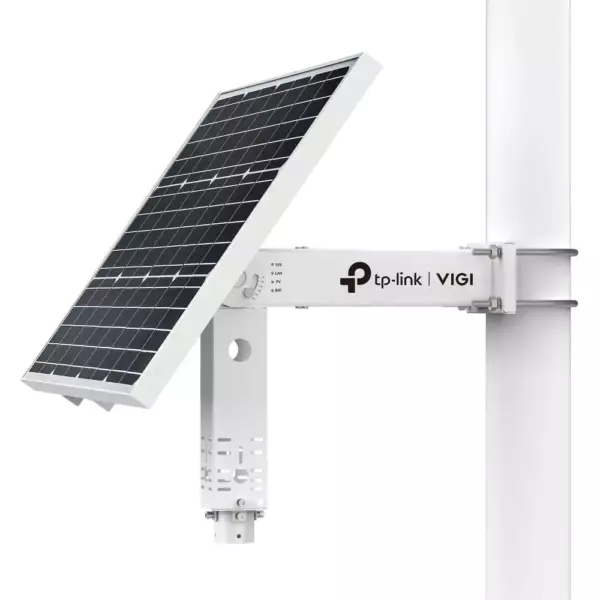
VIGI accessories are the parts that make a camera installation solid rather than improvised: mounting brackets and junction boxes, PoE adapters and power supplies, weatherproof housings, mounting poles and cable glands.

They matter more than they look. The right bracket sets the camera at the correct angle and keeps it there through wind and vibration; a junction box hides the cable joint and keeps water out; the correct power supply avoids the night-time reboots that come from an underpowered camera.

Original VIGI accessories fit the camera exactly and keep the warranty intact. Send us the camera model and mounting surface and we will confirm the parts. We are the official TP-Link partner in Azerbaijan.

How to build a CCTV system — VIGI for business sites

Watching a home with one or two cameras and running surveillance on a site are different jobs. A shop, office, warehouse, apartment complex or production hall needs a set: cameras + an NVR recorder + a PoE switch + management software. That is exactly what the VIGI range is built for.

1. Tapo or VIGI?

TapoVIGI
WhereFlat, houseBusiness site
Camera count1–44–64 and beyond
RecordingmicroSD cardNVR with a hard drive, continuous
PowerMains socketPoE — one cable carries data and power
ManagementTapo appVIGI Security Manager, VMS, mobile app

2. How many channels you need

An NVR channel is one camera. The rule: allow headroom above today's camera count — these systems almost always grow. Planning six cameras? Buy an eight-channel recorder; for twelve, a sixteen-channel one. The site carries 4, 8, 16, 32 and 64-channel models: NVR1004H, NVR1008H, NVR1016H, NVR2016H, NVR4016H, NVR4032H, NVR4064H.

The -4P / -8P / -16P suffix means the recorder has its own PoE ports — cameras plug straight into it and no separate switch is needed. For smaller sites that is the tidiest option.

3. Working out drive capacity

A practical planning figure: a 4 MP camera with H.265 compression and moderate activity uses roughly 10 GB a day. So eight cameras × 10 GB × 30 days ≈ 2.4 TB for a month of footage. The figure is an estimate and depends on three things: bitrate, frame rate and how much movement is in the scene. Recording only on motion stretches the archive two to three times. The drive is bought separately for the recorder — depending on the model there are one, two or more bays.

4. PoE budget and cabling

Each camera draws a certain wattage from the PoE switch. The switch's total PoE budget must exceed the sum of all cameras — especially with outdoor cameras that have heaters or spotlights. The VIGI line covers this with the PS20, PS30 and PS90 switches. Cabling is Cat5e/Cat6 with a single run up to 100 metres; anything further needs an intermediate switch or fibre.

5. Ready-made kit or separate parts

The site stocks complete kits (NK4P-T4425-2T, NK8P-B434I, NK8MP-T6425-2T) — recorder, cameras and drive in one box, compatibility guaranteed, installation faster. For a standard site that is the simplest route. If the cameras need to differ (some outdoor, some indoor, one for plate recognition), picking the components separately is the better approach.

6. Management software

There are three ways to watch: VIGI Security Manager on a computer, VIGI VMS for larger deployments, and the VIGI mobile app. All are free with no subscription. The AI features — telling people from vehicles, line crossing, intrusion zones — are explained on the VIGI AI detection page.

Frequently asked questions

Can it work without an NVR?

It can — VIGI cameras also record to microSD. But on a site with several cameras the recorder matters: footage is in one place, the archive survives if a camera is damaged, and searching by event is far easier.

Can I watch from my phone?

Yes, through the VIGI mobile app from anywhere — both live view and archive. No static IP is required.

Does recording stop if the internet goes down?

No. The NVR is a local device and keeps recording without internet. Only remote viewing is interrupted.

How many days of footage should be kept?

For most sites 15–30 days is enough. Banks, pharmacies and some sectors may face legal requirements — that has to be checked case by case.

Do you design and install?

Yes. In Baku we survey the site, plan camera positions, calculate channels and storage, run the cabling and install. Get in touch.

Need installation too?

Router and mesh setup, ISP configuration and a Wi-Fi survey — from 25 ₼. Free site visit and quote in Baku, six months warranty.

Wi-Fi installation service →
Select the fields to display. The others will be hidden. Drag to reorder.
  • Image
  • SKU
  • Rating
  • Price
  • In stock
  • Availability
  • Add to cart
  • Short description
  • Description
  • Specifications
Click outside to hide the compare bar
Compare