




Range Extenders


BE3600 Dual-Band Wi-Fi…
Original price was: 261 ₼.237 ₼Current price is: 237 ₼.


AX1500 Wi-Fi Range…
Original price was: 114 ₼.104 ₼Current price is: 104 ₼.

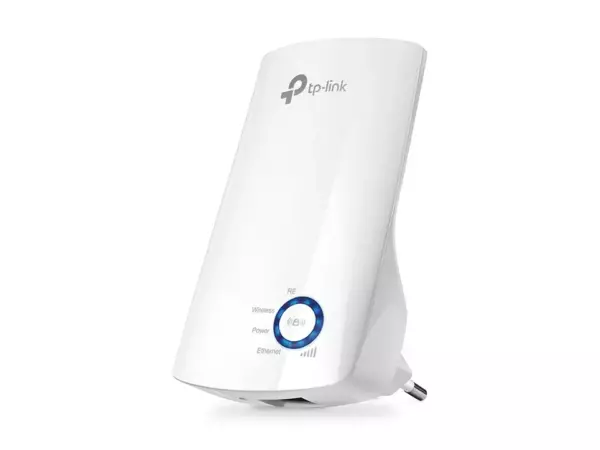
300Mbps Wi-Fi Range…
Original price was: 38 ₼.34 ₼Current price is: 34 ₼.

300Mbps Wi-Fi Range…
Original price was: 38 ₼.34 ₼Current price is: 34 ₼.


About Range Extenders.
Range extenders are the quickest fix for a Wi-Fi dead zone. Plug one into a socket roughly halfway between the router and the weak spot, press WPS or set it up in the app, and coverage reaches the far bedroom, the kitchen or the balcony.
Models differ in speed and in how they behave. Dual-band units keep the 5 GHz band free for fast devices; models with an Ethernet port also give a wired connection to a TV or console at the far end; and OneMesh or EasyMesh versions join your router under a single network name, so your phone hands over automatically instead of you switching networks by hand.
Placement matters more than the model: an extender only repeats the signal it receives, so put it where the signal is still good, not inside the dead zone. We are the official TP-Link partner in Azerbaijan.
How to choose a Wi-Fi extender
An extender picks up your existing Wi-Fi signal and rebroadcasts it. It belongs where the signal still reaches but has grown weak — roughly halfway between the router and the problem room. The most common mistake is putting the extender in the far room where the signal never arrives at all. In that case the device amplifies a weak signal and nothing improves.
1. Model comparison
| Model | Standard | Speed | Best for |
|---|---|---|---|
| TL-WA850RE, TL-WA855RE | Wi-Fi 4 | 300 Mbps | The simplest need — one room, messaging and video calls |
| TL-WA860RE | Wi-Fi 4 | 300 Mbps | Same, plus a pass-through socket (the unit does not block the outlet) |
| RE200 | Wi-Fi 5 | 750 Mbps | Dual-band — faster on 5 GHz |
| RE305 | Wi-Fi 5 | 1200 Mbps | Video streaming, more devices |
| RE505X | Wi-Fi 6 | 1500 Mbps | Paired with a Wi-Fi 6 router, a device-heavy home |
| RE705X | Wi-Fi 6 | 3000 Mbps | Large area, high-speed plan |
| RE235BE | Wi-Fi 7 | BE3600 | A home with a Wi-Fi 7 router, maximum speed |
2. Extender, mesh or powerline?
An extender is the cheapest and fastest fix, set up in 15 minutes. The downside: because it repeats the signal, throughput drops by roughly half and a separate network name often appears. Mesh (Deco) gives one network across the whole home and the connection does not drop as you move between rooms; it costs more, but it is the proper solution. Powerline carries the signal over the electrical wiring; if thick concrete walls kill Wi-Fi completely, it may be the only wireless option left.
A simple rule: one problem room — an extender. Coverage everywhere — mesh. Walls killing the signal — powerline.
3. OneMesh — one network with an extender
Some TP-Link routers support OneMesh. If both the router and the extender support it, the extender does not create a separate network — together with the router it forms a single Wi-Fi network, and your phone switches to the stronger point on its own as you move around. In other words, a near-mesh result with the router you already own. Check compatibility on the product page.
4. Setup
The easiest way: plug the extender into an outlet next to the router, connect it through the Tether app or the WPS button, then move it to an outlet closer to the problem room. The signal indicator on the unit helps you find the right spot — a green light means the position works.
More on this in our blog
Frequently asked questions
Does an extender reduce speed?
Yes, usually by about half — the device talks to the router and to you at the same time. On dual-band models (RE305 and above) the loss is considerably smaller.
Will the network name change?
In normal mode an extender usually creates a separate network ending in "_EXT". If OneMesh is supported, the name stays the same and the network becomes one.
Which outlet should I use?
Between the router and the problem room, at a point where the signal is still good. If the indicator is green, the position is right.
Can I use several extenders?
Technically yes, but it is not recommended — each one cuts the speed again. If you need two or three points, a mesh system is the better choice.
Is there a warranty?
Yes, every device is sold with an official warranty from TP-Link's official partner in Azerbaijan.
Need installation too?
Router and mesh setup, ISP configuration and a Wi-Fi survey — from 25 ₼. Free site visit and quote in Baku, six months warranty.
Wi-Fi installation service →