TP-Link Tapo H100 is part of the TP-Link Tapo smart-home line — control from your phone, automatic switching on a schedule, and scenes that combine it with other Tapo devices. In most cases no separate hub is needed; your home Wi-Fi is enough.
Typical uses: turning lights on by schedule, switching something off remotely while you are out, tracking energy use, and building automations triggered by a motion or door sensor.
Key specifications
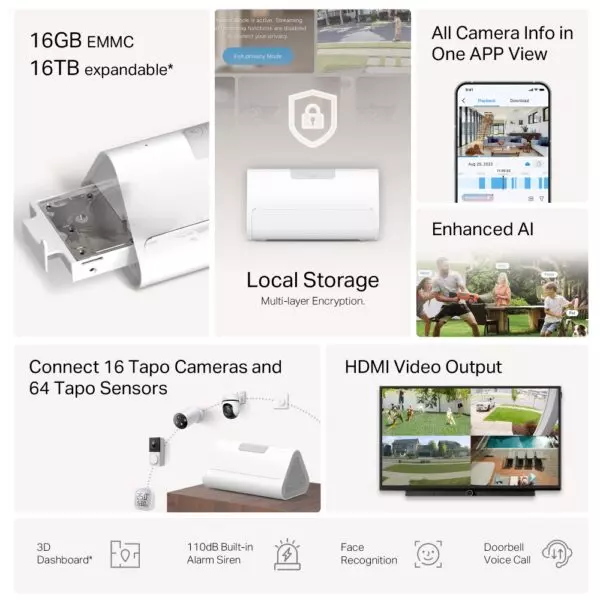
Reliable Long-Range Connections - Keep sub-devices connected at all times through the robust wireless network.
Low-Power Wireless Protocol - Make connected devices work energy-efficiently, promising longer standby time.
Smart Alarm - Coordinates with Tapo smart sensors to warn of danger or deter intruders.
Smart Doorbell - Pair it with Tapo Smart Button to build your smart doorbell system, plus 19 ringtones to choose from.
Tapo Ecology - Connect with up to 64 smart devices for an immersive and comprehensive smart home experience.
Price in Baku, delivery and installation
The current price on the site is 48 ₼. It includes the official TP-Link warranty, delivery in Baku and shipping to the regions on request.
If you also need installation, our Wi-Fi and router installation service starts from 25 ₼; the site visit and quote in Baku are free and we give a 6-month warranty.
Frequently asked questions about TP-Link Tapo H100
Do I need a hub for TP-Link Tapo H100?
Wi-Fi Tapo devices (plugs, bulbs, cameras) connect straight to your home network and need no hub. Only the battery-powered sensors and buttons require a hub such as the H100, because they use a separate low-power radio.
Does it work without internet?
Physical control (the button or switch) keeps working and some schedules run from the device memory. Remote control and notifications pause until the connection is back.
Does it work with voice assistants?
Yes, Tapo devices work with the popular voice assistants, and inside the app you can build scenes that trigger several devices with a single command.
What about warranty and delivery?
The device is sold by the official TP-Link partner in Azerbaijan with official warranty. Delivery in Baku is available and shipping to the regions is possible. If you need installation, see our services page.
Select the fields to display. The others will be hidden. Drag to reorder.







Reviews
There are no reviews yet.