TP-Link TL-WA901N

450Mbps Wireless N Access Point

59 ₼

Birbank logo
Installment payment calculator with Birbank
Installment payment terms apply to the non-discounted price
0%
2 mon.
0%
3 mon.
0%
4 mon.
0%
5 mon.
0%
6 mon.
Monthly payment 32 ₼
Need installation too?Site visit and quote in Baku are freeOffice network setup →

The TP-Link TL-WA901N is a 450 Mbps wireless access point. It is used to add coverage where Wi-Fi does not reach — in an office, a café, a warehouse, a shop or the far side of a house. It is placed where a cable runs and serves wireless from there.

The unit supports several operating modes, which makes it versatile:

  • Access point — turns a wired network into Wi-Fi
  • Client — picks up Wi-Fi and feeds it over cable to a device (a TV or computer with no Wi-Fi, say)
  • Universal / WDS repeater — extends the range of existing Wi-Fi
  • Wireless bridge — joins two buildings or two networks without cable

The unit runs from an ordinary power adapter. Security is set with WPA-PSK/WPA2-PSK encryption, and a device can join with one press of the WPS button.

  • Wireless N — 450 Mbps
  • 4 modes: AP, client, repeater, bridge
  • WPA-PSK / WPA2-PSK encryption
  • Quick WPS pairing
  • Runs from a power adapter
  • Ceiling or wall mounting

For offices, cafés, warehouses and shops. Get in touch for help with installation. Sold in Baku with official partner warranty.

HARDWARE FEATURES
Interface 1× 10/100M Ethernet Port(RJ45)
Support Passive PoE
Button Power On/Off Button, Reset Button, WPS Button
External Power Supply 9VDC / 0.85A
Wireless Standards IEEE 802.11n, IEEE 802.11g, IEEE 802.11b
Dimensions ( W x D x H ) 7.7 × 5.3 × 1.4 in (195 × 134 × 36 mm )
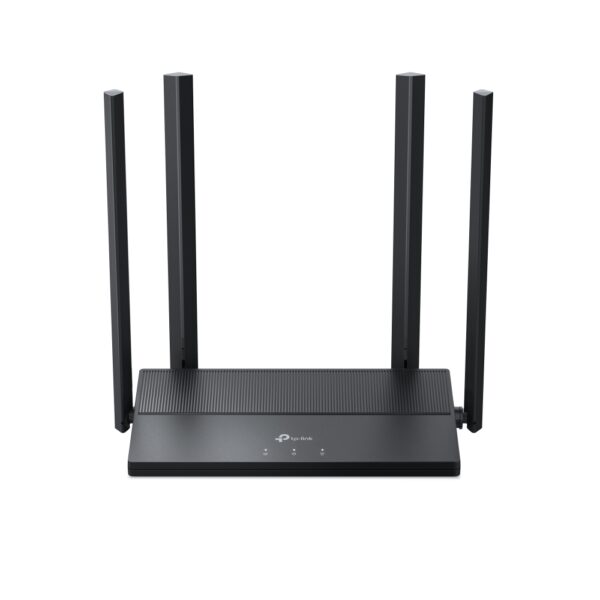
Antenna Type 3 Fixed Omni-Directional Antennas
WIRELESS FEATURES
Frequency 2.4 GHz
Signal Rate 450 Mbps at 2.4 GHz
Reception Sensitivity 11g 54M: -76dBm
11n 20Mbps: -73dBm
11n 40Mbps: -70dBm
Transmit Power CE: <20dBm; FCC: <30dBm
Wireless Modes Access Point, Range Extender, Client, Multi-SSID
Wireless Functions Enable/Disable Wireless Radio, WDS Bridge, WMM,
Wireless Statistics
Wireless Security 64/128-bit WEP, WPA/WPA2, WPA-PSK/WPA-PSK2
encryptions
DHCP Server, DHCP Client List
Quality of Service WMM
Management SNMP
Advanced Functions Up to 30 meters PoE is supported
OTHERS
Certification CE, FCC, RoHS
Package Contents Wireless N Access Point TL-WA901N
Power Adapter
Passive PoE Power Injector
RJ45 Ethernet Cable
Quick Installation Guide
System Requirements Microsoft Windows 98SE/NT/2000/XP/Vista™/7/8/8.1/10, MAC OS,
NetWare, UNIX or Linux
Internet Explorer 11, Firefox 12.0, Chrome 20.0, Safari 4.0, or other
Java-enabled browser
Cable or DSL Modem
Subscription with an Internet Service Provider (for Internet access)
Environment Operating Temperature: 0°C~40°C (32°F~104°F)
Storage Temperature: -40°C~70°C (-40°F~158°F)
Operating Humidity: 10%~90% non-condensing
Storage Humidity: 5%~90% non-condensing
Protocol Support IPv4, IPv6

Reviews

There are no reviews yet.

Be the first to review “TP-Link TL-WA901N”

Your email address will not be published. Required fields are marked *

Related Products

TP-Link TL-WA901N — Omada access point

TP-Link TL-WA901N is part of the TP-Link Omada system: it is built to give steady Wi-Fi to many users at once — in an office, shop, cafe, hotel or warehouse. Unlike a home router it holds a large number of devices in parallel and is managed centrally.

Who it suits: places where 20–30 or more devices connect, offices spread over several rooms, shops and cafes that need guest Wi-Fi. The access points are gathered into one panel through an Omada controller (OC200 or cloud), and the guest network is kept separate from the main one.

Key specifications

Access pointturns a wired network into Wi-Fi
Clientpicks up Wi-Fi and feeds it over cable to a device (a TV or computer with no Wi-Fi, say)
Universal / WDS repeaterextends the range of existing Wi-Fi
Wireless bridgejoins two buildings or two networks without cable
Wireless N450 Mbps
4 modesAP, client, repeater, bridge
WPA-PSK / WPA2-PSK encryption
Quick WPS pairing

Price in Baku, delivery and installation

The current price on the site is 59 ₼. It includes the official TP-Link warranty, delivery in Baku and shipping to the regions on request.

If you also need installation, our Office network setup service starts from 200 ₼; the site visit and quote in Baku are free and we give a 6-month warranty.

Before you choose

For a comparison with the closest models, a price table and buying advice, see the guide for this category.

Frequently asked questions about TP-Link TL-WA901N

Do I need a controller for TP-Link TL-WA901N?

A single access point can run in standalone mode. From two points up a controller (the OC200 hardware, or the software/cloud version) makes life much easier: every point appears in one panel, settings are entered once, and roaming between points behaves properly.

How is it powered?

The access points are powered over the network cable via PoE — no socket needed in the ceiling. A PoE switch or the injector in the box does the job; as the number of points grows a PoE switch becomes the cheaper option.

Can I set up guest Wi-Fi in a cafe?

Yes. In Omada the guest network is a separate SSID with access to the main network blocked, and you can add a login portal, time limits and speed limits.

What about warranty and delivery?

The device is sold by the official TP-Link partner in Azerbaijan with official warranty. Delivery in Baku is available and shipping to the regions is possible. If you need installation, see our services page.

Select the fields to display. The others will be hidden. Drag to reorder.
  • Image
  • SKU
  • Rating
  • Price
  • In stock
  • Availability
  • Add to cart
  • Short description
  • Description
  • Specifications
Click outside to hide the compare bar
Compare