






| HARDWARE FEATURES | |
|---|---|
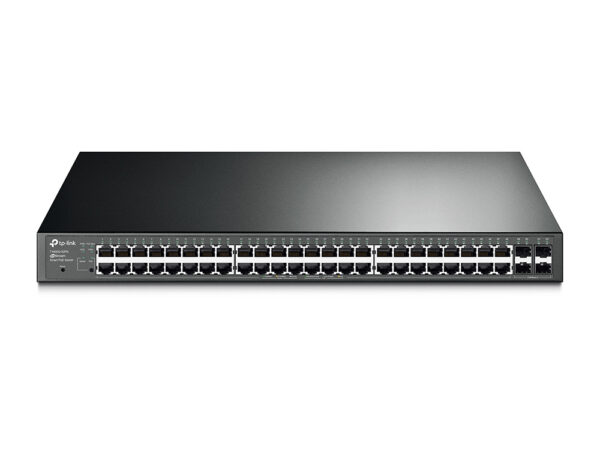
| Interface | • 48× 10/100/1000 Mbps RJ45 PoE+ Ports • 4× 10G SFP+ Slots • 1× RJ45 Console Port • 1× Micro-USB Console Port |
| Fan Quantity | 3 |
| Power Supply | 100-240 V AC~50/60 Hz |
| PoE+ Ports(RJ45) | • Standard: 802.3at/af compliant • PoE+ Ports: 48 Ports, up to 30 W per port • Power Budget: 500 W* |
| Dimensions ( W x D x H ) | 17.3 × 13.0 × 1.7 in (440 × 330 × 44 mm) |
| Mounting | Rack Mountable |
| Max Power Consumption | • 49.19 W (110V/60Hz) ( no PD device connected) • 635.7 W (110V/60Hz) ( with 500 W PD device connected) |
| Max Heat Dissipation | • 167.85 BTU/hr (110 V/60 Hz) (no PD connected) • 2169.2 BTU/hr (110 V/60 Hz) (with 500 W PD connected) |
| PERFORMANCE | |
|---|---|
| Switching Capacity | 176 Gbps |
| Packet Forwarding Rate | 130.9 Mpps |
| MAC Address Table | 16 K |
| Packet Buffer Memory | 12 Mbit |
| Jumbo Frame | 9 KB |
| SOFTWARE FEATURES | |
|---|---|
| Quality of Service | • 8 priority queues • 802.1p CoS/DSCP priority • Queue scheduling – SP (Strict Priority) – WRR (Weighted Round Robin) – SP+WRR • Bandwidth Control – Port/Flow based Rating Limiting • Smoother Performance • Action for Flows – Mirror (to supported interface) – Redirect (to supported interface) – Rate Limit – QoS Remark |
| L3 Features | • 128 IPv4/IPv6 Interfaces • Static Routing – 48 static routes • Static ARP – 128 Static Entries • Proxy ARP • Gratuitous ARP • DHCP Server • DHCP Relay – DHCP Interface Relay – DHCP VLAN Relay • DHCP L2 Relay |
| L2 and L2+ Features | • Link Aggregation – static link aggregation – 802.3ad LACP – Up to 8 aggregation groups, containing 8 ports per group • Spanning Tree Protocol – 802.1d STP – 802.1w RSTP – 802.1s MSTP – STP Security: TC Protect, BPDU Filter, Root Protect • Loopback Detection – Port based – VLAN based • Flow Control – 802.3x Flow Control – HOL Blocking Prevention • Mirroring – Port Mirroring – CPU Mirroring – One-to-One – Many-to-One – Tx/Rx/Both |
| L2 Multicast | • IGMP Snooping – IGMP v1/v2/v3 Snooping – Fast Leave – IGMP Snooping Querier – IGMP Authentication • IGMP Authentication • MLD Snooping – MLD v1/v2 Snooping – Fast Leave – MLD Snooping Querier – Static Group Config – Limited IP Multicast • MVR • Multicast Filtering: 256 profiles and 16 entries per profile |
| Advanced Features | • Automatic Device Discovery • Batch Configuration • Batch Firmware Upgrading • Intelligent Network Monitoring • Abnormal Event Warnings • Unified Configuration • Reboot Schedule |
| VLAN | • VLAN Group – Max 4K VLAN Groups • 802.1Q Tagged VLAN • MAC VLAN: 30 Entries • Protocol VLAN: Protocol Template 16, Protocol VLAN 16 • Private VLAN • GVRP • VLAN VPN (QinQ) – Port-Based QinQ – Selective QinQ • Voice VLAN |
| Access Control List | • Time-based ACL • MAC ACL – Source MAC – Destination MAC – VLAN ID – User Priority – Ether Type • IP ACL -Source IP – Destination IP – Fragment – IP Protocol – TCP Flag – TCP/UDP Port – DSCP/IP TOS – User Priority • Combined ACL • Packet Content ACL • IPv6 ACL • Policy – Mirroring – Redirect – Rate Limit – QoS Remark • ACL apply to Port/VLAN |
| Security | • IP-MAC-Port Binding – 512 Entries – DHCP Snooping – ARP Inspection – IPv4 Source Guard: 100 Entries • IPv6-MAC-Port Binding – 512 Entries – DHCPv6 Snooping – ND Detection – IPv6 Source Guard: 100 Entries • DoS Defend • Static/Dynamic Port Security – Up to 64 MAC addresses per port • Broadcast/Multicast/Unicast Storm Control – kbps/ratio control mode • 802.1X – Port base authentication – Mac base authentication – VLAN Assignment – MAB – Guest VLAN – Support Radius authentication andaccountability • AAA (including TACACS+) • Port Isolation • Secure web management through HTTPS with SSLv3/TLS 1.2 • Secure Command Line Interface (CLI) management with SSHv1/SSHv2 • IP/Port/MAC based access control |
| IPv6 | • IPv6 Dual IPv4/IPv6 • Multicast Listener Discovery (MLD) Snooping • IPv6 ACL • IPv6 Interface • Static IPv6 Routing • IPv6 neighbor discovery (ND) • Path maximum transmission unit (MTU) discovery • Internet Control Message Protocol (ICMP) version 6 • TCPv6/UDPv6 • IPv6 applications – DHCPv6 Client – Ping6 – Tracert6 – Telnet (v6) – IPv6 SNMP – IPv6 SSH – IPv6 SSL – Http/Https – IPv6 TFTP |
| MIBs | • MIB II (RFC1213) • Interface MIB (RFC2233) • Ethernet Interface MIB (RFC1643) • Bridge MIB (RFC1493) • P/Q-Bridge MIB (RFC2674) • RMON MIB (RFC2819) • RMON2 MIB (RFC2021) • Radius Accounting Client MIB (RFC2620) • Radius Authentication Client MIB (RFC2618) • Remote Ping, Traceroute MIB (RFC2925) • Support TP-Link private MIB |
| MANAGEMENT | |
|---|---|
| Omada App | Yes. Requiring the use of OC300, OC200, Omada Cloud-Based Controller, or Omada Software Controller. |
| Centralized Management | • Omada Cloud-Based Controller • Omada Hardware Controller (OC300) • Omada Hardware Controller (OC200) • Omada Software Controller |
| Cloud Access | Yes. Requiring the use of OC300, OC200, Omada Cloud-Based Controller, or Omada Software Controller. |
| Zero-Touch Provisioning | Yes. Requiring the use of Omada Cloud-Based Controller. |
| Management Features | • Web-based GUI • Command Line Interface (CLI) through the console port, telnet • SNMP v1/v2c/v3 – Trap/Inform – RMON (1,2,3,9 groups) • SDM Template • DHCP/BOOTP Client • 802.1ab LLDP/LLDP-MED • DHCP AutoInstall • Dual Image, Dual Configuration • CPU Monitoring • Cable Diagnostics • EEE • Password Recovery • SNTP • System Log |
| OTHERS | |
|---|---|
| Certification | CE, FCC, RoHS |
| Package Contents | • TL-SG3452XP Switch • Power Cord • Quick Installation Guide • Rackmount Kit • Rubber Feet |
| System Requirements | Microsoft® Windows® 98SE, NT, 2000, XP, Vista™ or Windows 7/8/10/11, MAC® OS, NetWare®, UNIX® or Linux. |
| Environment | • Operating Temperature: 0–40 ℃ (32–104 ℉); • Storage Temperature: -40–70 ℃ (-40–158 ℉) • Operating Humidity: 10–90% RH non-condensing • Storage Humidity: 5–90% RH non-condensing |

Reviews
There are no reviews yet.