






TP-Link ER707-M2
Omada Multi-Gigabit VPN Gateway
Original price was: 503 ₼.455 ₼Current price is: 455 ₼.

Installment payment calculator with Birbank
Installment payment terms apply to the non-discounted price
Installment payment terms apply to the non-discounted price
Monthly payment
251.5 ₼
- 2× 2.5 Gbps RJ45 ports (1× WAN, 1× WAN/LAN)
- 5× Gigabit WAN/LAN ports (1× SFP, 4× RJ45)
- Load Balancing on up to 6 WAN ports‡ increases the utilization rate of multi-line broadband
- 1× USB port (Supports USB storage, and LTE backup with LTE dongle)
- High-security SSL/ IPSec / GRE§ / WireGuard / PPTP / L2TP VPN & OpenVPN
- Centralized cloud management via the web or the Omada app*
- DoS/DDoS protection, IP/MAC/URL filtering, DPI, and IPS/IDS for enhanced security
- Rackmount, Desktop, or Wall Mount
| SECURITY | |
|---|---|
| Access Control | Source/Destination IP Based Access Control |
| Filtering | • WEB Group Filtering§ • URL Filtering • Web Security§ |
| ARP Inspection | • Sending GARP Packets§ • ARP Scanning§ • IP-MAC Binding§ |
| Attack Defense | • TCP/UDP/ICMP Flood Defense • Block TCP Scan (Stealth FIN/Xmas/Null) • Block Ping from WAN |
| HARDWARE FEATURES | |
|---|---|
| Standards and Protocols | • IEEE 802.3, IEEE802.3u, IEEE802.3ab, IEEE802.3z, IEEE 802.3x, IEEE 802.1q, IEEE802.3bz • TCP/IP, DHCP, ICMP, NAT, PPPoE, NTP, HTTP, HTTPS, DNS, IPSec, PPTP, L2TP, OpenVPN, SNMP, WireGuard VPN |
| Interface | • 1× 2.5G RJ45 WAN Port • 1× 2.5G RJ45 WAN/LAN Port • 1× Gigabit SFP WAN/LAN Port • 4× Gigabit RJ45 WAN/LAN Ports • 1× USB 2.0 Port (Supports USB storage, and LTE backup with LTE dongle) |
| Network Media | • 10BASE-T: UTP category 3, 4, 5 cable (Max 100 m) EIA/TIA-568 100Ω STP (Max 100 m) • 100BASE-TX: UTP category 5, 5e cable (Max 100 m) EIA/TIA-568 100Ω STP (Max 100 m) • 1000BASE-T: UTP category 5, 5e, 6 cable (Max 100 m) • 2500BASE-T: UTP category 5, 5e, 6 cable (Max 100 m) |
| Fan Quantity | Fanless |
| Button | Reset Button |
| Power Supply | 12V/1.5A Adapter |
| PoE Budget | – |
| Flash | 128MB NAND |
| DRAM | 1 GB DDR4 |
| LED | PWR, SYS, SFP, USB, WAN (Speed, Link/Act), LAN (Speed, Link/Act) |
| Dimensions ( W x D x H ) | 8.9 × 5.2 × 1.4 in (226 × 131 × 35 mm) |
| Protection | 4 kV surge protection |
| Enclosure | Steel |
| Mounting | Rackmout, Desktop, or Wall Mount |
| Max Power Consumption | 14.2 W (with USB2.0 connected) 7.1 W (without USB2.0 connected) |
| PERFORMANCE | |
|---|---|
| IPS Throughput | TCP: 208 Mbps; UDP: 161 Mbps |
| DPI Throughput | TCP: 1823 Mbps; UDP: 1272 Mbps |
| Concurrent Session | 500,000 |
| New Sessions /Second | 6,000 |
| NAT (Static IP) | 2365.17 Mbps / 2364.45 Mbps |
| NAT(DHCP) | 2364.45 Mbps / 2366.04 Mbps |
| NAT(PPPoE) | 2347.14 Mbps / 2348.29 Mbps |
| NAT (L2TP) | 1308.86 Mbps / 974.10 Mbps |
| NAT (PPTP) | 1236.27 Mbps / 1280.99 Mbps |
| IPsec VPN Throughput | • ESP-SHA1-AES256: 673.3 Mbps • ESP-SHA256-AES256: 650.2 Mbps • ESP-SHA384-AES256: 629.3 Mbps • ESP-SHA512-AES256: 633.8 Mbps |
| L2TP VPN Throughput | • Unencrypted: 1243.7 Mbps • Encrypted: 561.0 Mbps |
| SSL VPN Throughput | 132.24 Mbps |
| 66 Byte Packet forwarding rate | 1832.69 Mbps / 1741.84 Mbps |
| 1,518 Byte Packet forwarding rate | 2461.18 Mbps / 2457.32 Mbps |
| BASIC FUNCTIONS | |
|---|---|
| WAN Connection Type | • IPv4_Static IP • IPv4_Dynamic IP • IPv4_PPPOE • IPv4_L2TP • IPv4_PPTP • IPv6_PPP • IPv6_DHCPv6 • IPv6_Static IP • IPv6_6in4 • IPv6_Pass-Through • Mobile Broadband: 4G/3G modem for backup via USB port |
| MAC Clone | Modify WAN/LAN MAC Address† |
| DHCP | • DHCP Server • DHCPv6 PD Server (only in Standalone Mode) • DHCP Options Customization • DHCP Address Reservation • Multi-IP Interfaces* • Multi-Net DHCP* |
| IPv6 | StaticIP / SLAAC / DHCPv6 / PPPoE / 6to4Tunnel / PassThrough / Non-Address mode |
| VLAN | 802.1Q VLAN |
| IPTV | IGMP v2/v3 Proxy, Custom Mode, Bridge Mode |
| ADVANCED FUNCTIONS | |
|---|---|
| Advanced Routing | • Static Routing • Policy Routing • RIP (only in Standalone Mode) • OSPF (only in Standalone Mode) |
| Bandwidth Control | • IP/Port-based Bandwidth Control • Guarantee & Limited Bandwidth |
| Load Balance | • Intelligent Load Balance • Application Optimized Routing • Link Backup (Timing§, Failover) • Online Detection |
| NAT | • One-to-One NAT§ • Multi-Net NAT • Port Forwarding • Port Triggering§ • NAT-DMZ • FTP/H.323/SIP/IPSec/PPTP ALG • UPnP |
| Session Limit | IP-based Session Limit |
| VPN | |
|---|---|
| IPsec VPN | • 100 IPSec VPN Tunnels • LAN-to-LAN, Client-to-LAN • Main, Aggressive Negotiation Mode • DES, 3DES, SHA1, AES128, AES192, AES256 Encryption Algorithm • IKEv1/v2 • MD5, SHA1, SHA2-384 and SHA2-512 Authentication Algorithm • NAT Traversal (NAT-T) • Dead Peer Detection (DPD) • Perfect Forward Secrecy (PFS) |
| PPTP VPN | • PPTP VPN Server • PPTP VPN Clients (12) • 60 Tunnels (Shared with L2TP) • PPTP with MPPE Encryption |
| L2TP VPN | • L2TP VPN Server • L2TP VPN Clients (12) • 60 Tunnels (Shared with PPTP) • L2TP over IPSec |
| OpenVPN | • OpenVPN Server • OpenVPN Clients (6) • 66 OpenVPN Tunnels* |
| AUTHENTICATION | |
|---|---|
| Web Authentication | • No Authentication • Simple Password* • Hotspot (Local User/Voucher*/SMS*/Radius*) • External Radius Server • External Portal Server* • LDAP |
| MANAGEMENT | |
|---|---|
| Omada App | Yes. Requires the use of Omada Hardware Controller, Omada Cloud-Based Controller, or Omada Software Controller. |
| Centralized Management | • Omada Cloud-Based Controller • Omada Hardware Controller • Omada Software Controller |
| Cloud Access | Yes. Requires the use of Omada Hardware Controller, Omada Cloud-Based Controller, or Omada Software Controller. |
| Service | Dynamic DNS (Dyndns, No-IP, Peanuthull, Comexe) |
| Maintenance | • Web Management Interface • Remote Management • Export & Import Configuration • SNMP v1/v2c/v3* • Diagnostics (Ping & Traceroute)§ • NTP Synchronize§ • Port Mirroring • CLI (only in Standalone Mode) • Syslog Support |
| Zero-Touch Provisioning | Yes. Requires the use of Omada Cloud-Based Controller. |
| Management Features | • Automatic Device Discovery* • Batch Configuration* • Batch Firmware Upgrading* • Intelligent Network Monitoring* • Abnormal Event Warnings* • Unified Configuration* • Reboot Schedule* |
| OTHERS | |
|---|---|
| Certification | CE, FCC, RoHS |
| Package Contents | • ER707-M2 • Power Adapter • Quick Installation Guide • Rackmount Kit |
| System Requirements | Microsoft Windows 98SE, NT, 2000, XP, Vista™ or Windows 7/8/8.1/10, MAC OS, NetWare, UNIX or Linux |
| Environment | • Operating Temperature: 0–40 ℃ (32–104 ℉); • Storage Temperature: -40–70 ℃ (-40–158 ℉) • Operating Humidity: 10–90% RH non-condensing • Storage Humidity: 5–90% non-condensing |
Related Products

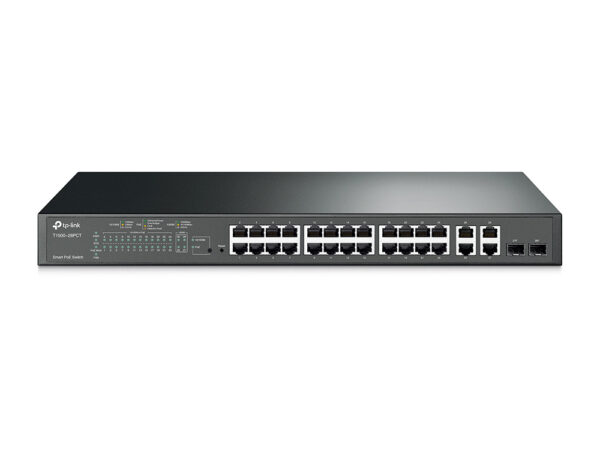
TP-Link T1500-28PCT JetStream 24-Port 10/100Mbps + 4-Port Gigabit Smart PoE+ Switch
24-Port 10/100Mbps +…
524 ₼
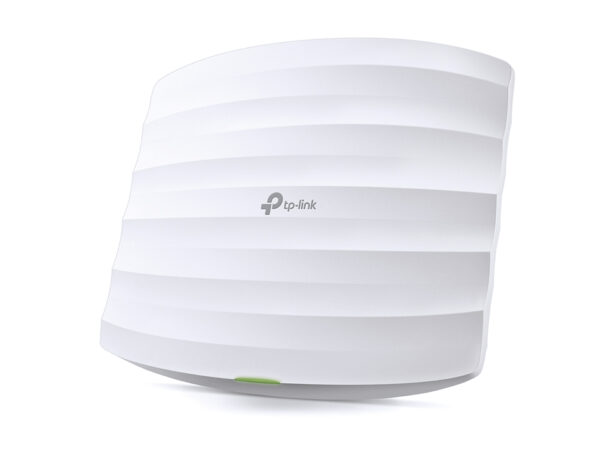
TP-Link EAP320 AC1200 Wireless Dual Band Gigabit Ceiling Mount Access Point
AC1200 Wireless Dual…
176 ₼
TP-Link ER707-M2 — Omada access point
TP-Link ER707-M2 is part of the TP-Link Omada system: it is built to give steady Wi-Fi to many users at once — in an office, shop, cafe, hotel or warehouse. Unlike a home router it holds a large number of devices in parallel and is managed centrally.
Who it suits: places where 20–30 or more devices connect, offices spread over several rooms, shops and cafes that need guest Wi-Fi. The access points are gathered into one panel through an Omada controller (OC200 or cloud), and the guest network is kept separate from the main one.
Key specifications
| 2× 2.5 Gbps RJ45 ports (1× WAN, 1× WAN/LAN) | |
| 5× Gigabit WAN/LAN ports (1× SFP, 4× RJ45) | |
| Load Balancing on up to 6 WAN ports‡ increases the utilization rate of multi-line broadband | |
| 1× USB port (Supports USB storage, and LTE backup with LTE dongle) | |
| High-security SSL/ IPSec / GRE§ / WireGuard / PPTP / L2TP VPN & OpenVPN | |
| Centralized cloud management via the web or the Omada app* | |
| DoS/DDoS protection, IP/MAC/URL filtering, DPI, and IPS/IDS for enhanced security | |
| Rackmount, Desktop, or Wall Mount |
Price in Baku, delivery and installation
The current price on the site is 455 ₼. It includes the official TP-Link warranty, delivery in Baku and shipping to the regions on request.
If you also need installation, our Office network setup service starts from 200 ₼; the site visit and quote in Baku are free and we give a 6-month warranty.
Before you choose
For a comparison with the closest models, a price table and buying advice, see the guide for this category.
A detailed article on this topicWhat Is Omada? Business Wi-Fi for Offices, Cafés and Hotels Read →
Frequently asked questions about TP-Link ER707-M2
Do I need a controller for TP-Link ER707-M2?
A single access point can run in standalone mode. From two points up a controller (the OC200 hardware, or the software/cloud version) makes life much easier: every point appears in one panel, settings are entered once, and roaming between points behaves properly.
How is it powered?
The access points are powered over the network cable via PoE — no socket needed in the ceiling. A PoE switch or the injector in the box does the job; as the number of points grows a PoE switch becomes the cheaper option.
Can I set up guest Wi-Fi in a cafe?
Yes. In Omada the guest network is a separate SSID with access to the main network blocked, and you can add a login portal, time limits and speed limits.
What about warranty and delivery?
The device is sold by the official TP-Link partner in Azerbaijan with official warranty. Delivery in Baku is available and shipping to the regions is possible. If you need installation, see our services page.
Reviews
There are no reviews yet.