TP-Link Archer A10

AC2600 MU-MIMO Wi-Fi Router

266 ₼

Birbank logo
Installment payment calculator with Birbank
Installment payment terms apply to the non-discounted price
0%
2 mon.
0%
3 mon.
0%
4 mon.
0%
5 mon.
0%
6 mon.
Monthly payment 144.5 ₼
Need installation too?Site visit and quote in Baku are freeWi-Fi and router installation →
  • Extreme Dual Band Wi-Fi Speeds – 1733 Mbps on 5 GHz, 800 Mbps on 2.4 GHz
  • Ultimate Range – 4 antennas for wireless networks amplified, Beamforming for signal focused to connected devices
  • Higher Overall Throughput – MU-MIMO+Smart Connect+Airtime Fairness for maximum throughput
  • Secure Remote Access – OpenVPN & PPTP VPN server for secure remote access to your home network via the internet
  • Easy Setup – Intuitive Phone UI and Tether app for quick network setup within one minute
WIRELESS
Standards Wi-Fi 5
IEEE 802.11ac/n/a 5 GHz
IEEE 802.11n/b/g 2.4 GHz
WiFi Speeds AC2600
5 GHz: 1733 Mbps (802.11ac)
2.4 GHz: 800 Mbps (802.11n)
WiFi Range 3 Bedroom Houses


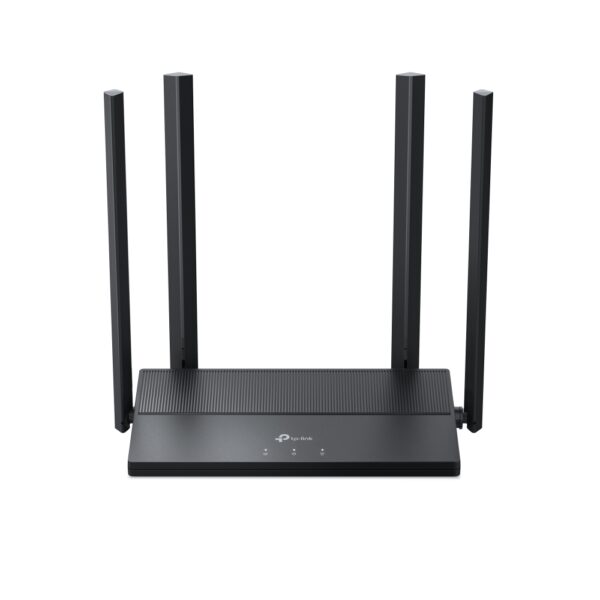
4× Fixed High-Performance Antennas (External and Internal)
Multiple antennas form a signal-boosting array to cover more directions and large areas

Beamforming
Concentrates wireless signal strength towards clients to expand WiFi range

4T4R
Multiple streams in the same band strengthen the fault tolerance in transmission

WiFi Capacity Medium


Dual-Band
Allocate devices to different bands for optimal performance

4×4 MU-MIMO
Simultaneously communicates with multiple MU-MIMO clients

Airtime Fairness
Improves network efficiency by limiting excessive occupation

Working Modes Router Mode
Access Point Mode
SECURITY
Network Security SPI Firewall
Access Control
IP & MAC Binding
Application Layer Gateway
Guest Network 1× 5 GHz Guest Network
1× 2.4 GHz Guest Network
VPN Server OpenVPN
PPTP
WiFi Encryption WPA
WPA2
WPA3
WPA/WPA2-Enterprise (802.1x)
HARDWARE
Processor Dual-Core CPU
Ethernet Ports 1× Gigabit WAN Port
4× Gigabit LAN Ports
Buttons Wi-Fi On/Off Button
Power On/Off Button
LED On/Off Button
WPS Button
Reset Button
Power 12 V ⎓ 1.5 A
SOFTWARE
Protocols IPv4
IPv6
Parental Controls URL Filtering
Time Controls
WAN Types Dynamic IP
Static IP
PPPoE
PPTP
L2TP
Quality of Service QoS by Device
Cloud Service OTA Firmware Upgrade
TP-Link ID
DDNS
NAT Forwarding Virtual Servers
Port Forwarding
Port Triggering
DMZ
UPnP
IPTV IGMP Proxy
IGMP Snooping
Bridge
Tag VLAN
DHCP Address Reservation
DHCP Client List
Server
DDNS TP-Link
NO-IP
DynDNS
Management Tether App
Webpage
OTHER
System Requirements Internet Explorer 11+, Firefox 12.0+, Chrome 20.0+, Safari 4.0+, or other JavaScript-enabled browser

Cable or DSL Modem (if needed)

Subscription with an internet service provider (for internet access)

Certifications FCC, CE, RoHS
Environment Operating Temperature: 0℃~40℃ (32℉ ~104℉)
Storage Temperature: -40℃~70℃ (-40℉ ~158℉)
Operating Humidity: 10%~90% non-condensing
Storage Humidity: 5%~90% non-condensing
TEST DATA
WiFi Transmission Power CE:
<20dBm(2.4GHz)
<23dBm(5GHz)
FCC:
<30dBm
WiFi Reception Sensitivity 5GHz:
11ac80M MCS9: -64dBm, 11ac80M MCS0: -89dBm
11ac40M MCS9: -68dBm, 11ac40M MCS0: -92dBm
11ac20M MCS8: -72dBm, 11ac20M MCS0: -95dBm
54M: -78dBm, 6M: -96dBm
2.4GHz:
11n40M MCS9: -68dBm, 11n40M MCS0: -93dBm
11n20M MCS8: -73dBm, 11n20M MCS0: -96dBm
54M: -78dBm, 6M: -97dBm
PHYSICAL
Dimensions (W×D×H) 8.5 × 6.5 × 1.4 in
(216 × 164 × 36.8 mm)
Package Contents Wi-Fi Router Archer A10
Power Adapter
RJ45 Ethernet Cable
Quick Installation Guide

Reviews

There are no reviews yet.

Be the first to review “TP-Link Archer A10”

Your email address will not be published. Required fields are marked *

Related Products

What TP-Link Archer A10 is and who it suits

TP-Link Archer A10 is a Wi-Fi router for a home or a small office: it shares one internet connection with every device. You plug the provider cable into the WAN port, and phones, laptops, smart TVs, consoles and smart-home devices all join the same network.

Who it suits: a 2–4 room flat, a single-storey house, a small office with 10–20 devices. For a two-storey house or more than 120 m² a single router usually falls short and a mesh system works better, because thick concrete walls cut the signal badly.

Key specifications

Extreme Dual Band Wi-Fi Speeds - 1733 Mbps on 5 GHz, 800 Mbps on 2.4 GHz
Ultimate Range - 4 antennas for wireless networks amplified, Beamforming for signal focused to connected devices
Higher Overall Throughput - MU-MIMO+Smart Connect+Airtime Fairness for maximum throughput
Secure Remote Access - OpenVPN & PPTP VPN server for secure remote access to your home network via the internet
Easy Setup - Intuitive Phone UI and Tether app for quick network setup within one minute

Price in Baku, delivery and installation

The current price on the site is 266 ₼. It includes the official TP-Link warranty, delivery in Baku and shipping to the regions on request.

If you also need installation, our Wi-Fi and router installation service starts from 25 ₼; the site visit and quote in Baku are free and we give a 6-month warranty.

Before you choose

For a comparison with the closest models, a price table and buying advice, see the guide for this category.

Frequently asked questions about TP-Link Archer A10

How large a flat does TP-Link Archer A10 cover?

Coverage depends on the number and material of the walls. In a 2–3 room flat with concrete walls, a router placed centrally in the hallway 1–1.5 m above the floor gives a steady signal in every room. From 4 rooms, or across two floors, you will need an extra extender or a mesh point.

Is it hard to set up?

No. With the TP-Link Tether app the setup takes 5–10 minutes from your phone: plug the cable into WAN, pick the connection type (DHCP or PPPoE) and set a network name and password. Some providers in Baku use PPPoE, in which case you need the username and password from your contract.

Will it fully replace my old router?

Yes. If your provider modem is a separate box, put it into bridge mode and let TP-Link Archer A10 act as the main router; that avoids double NAT and the problems it causes in games and video calls. The old router can still serve as an access point on the upper floor.

What about warranty and delivery?

The device is sold by the official TP-Link partner in Azerbaijan with official warranty. Delivery in Baku is available and shipping to the regions is possible. If you need installation, see our services page.

Select the fields to display. The others will be hidden. Drag to reorder.
  • Image
  • SKU
  • Rating
  • Price
  • In stock
  • Availability
  • Add to cart
  • Short description
  • Description
  • Specifications
Click outside to hide the compare bar
Compare