





Original price was: 173 ₼.157 ₼Current price is: 157 ₼.
Original price was: 209 ₼.189 ₼Current price is: 189 ₼.

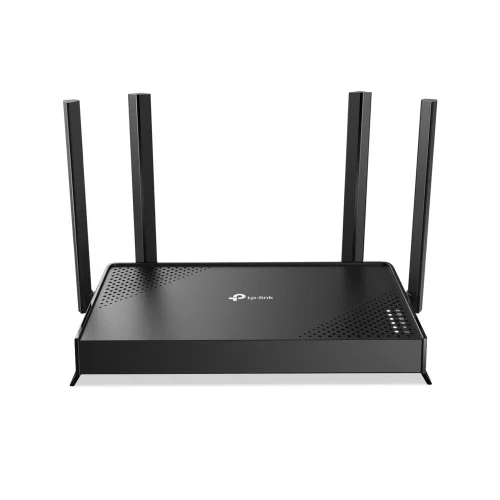
TP-Link Archer BE220 is a dual-band Wi-Fi 7 router built for fast, stable internet.
It delivers combined Wi-Fi speeds of up to 3.6 Gbps, making it ideal for 8K video streaming, online gaming and smart-home systems. Four external antennas and Beamforming technology provide wide coverage and a steady signal.
With EasyMesh you can combine devices from different manufacturers into a single network. The TP-Link Tether app makes it easy to manage the network from your phone.
One WAN and four LAN gigabit ports provide high-speed wired data transfer, while the HomeShield security system protects the network against modern cyber threats.
TP-Link Archer BE220 is compatible with the equipment of all internet service providers.
Technical specifications:
| WIRELESS | |
|---|---|
| Standards | Wi-Fi 7 IEEE 802.11be/ax/ac/n/a 5 GHz IEEE 802.11be/ax/n/b/g 2.4 GHz |
| WiFi Speeds | BE3600 — up to 3.6 Gbps combined |
| Bands | Dual-Band (2.4 GHz and 5 GHz) |
| Antennas | 4 × external antennas |
| Technologies | Multi-Link Operation (MLO) Beamforming EasyMesh |
| Wireless Modes | Router Mode Access Point Mode |
| HARDWARE | |
|---|---|
| Ethernet Ports | 1 × WAN Gigabit 4 × LAN Gigabit |
| Buttons | WPS / Reset |
| SECURITY | |
|---|---|
| Network Security | TP-Link HomeShield SPI Firewall Access Control |
| WiFi Encryption | WPA3 / WPA2 / WPA |
| Parental Controls | HomeShield Parental Controls |
| MANAGEMENT | |
|---|---|
| App | TP-Link Tether |
| Cloud Service | Remote management with TP-Link ID |
| Compatibility | Works with the equipment of all internet service providers |
Original price was: 173 ₼.157 ₼Current price is: 157 ₼.
Original price was: 163 ₼.147 ₼Current price is: 147 ₼.
Original price was: 408 ₼.370 ₼Current price is: 370 ₼.
Original price was: 546 ₼.494 ₼Current price is: 494 ₼.
Original price was: 425 ₼.385 ₼Current price is: 385 ₼.
Original price was: 362 ₼.328 ₼Current price is: 328 ₼.
Original price was: 446 ₼.404 ₼Current price is: 404 ₼.

Original price was: 215 ₼.195 ₼Current price is: 195 ₼.

Original price was: 404 ₼.366 ₼Current price is: 366 ₼.

Original price was: 362 ₼.328 ₼Current price is: 328 ₼.
TP-Link Archer BE220 Dual-Band Wi-Fi 7 Router is a Wi-Fi router for a home or a small office: it shares one internet connection with every device. You plug the provider cable into the WAN port, and phones, laptops, smart TVs, consoles and smart-home devices all join the same network.
Who it suits: a 2–4 room flat, a single-storey house, a small office with 10–20 devices. For a two-storey house or more than 120 m² a single router usually falls short and a mesh system works better, because thick concrete walls cut the signal badly.
| Model | TP-Link Archer BE220 |
|---|---|
| Device type | Wi-Fi 7 router |
| Wi-Fi standard | Wi-Fi 7 (802.11be) |
| Wi-Fi class | BE3600 |
| Combined speed | up to 3.6 Gbps |
| Bands | 2.4 GHz and 5 GHz (Dual-Band) |
| Antennas | 4 × external |
| Ports | 1 × WAN Gigabit, 4 × LAN Gigabit |
The current price on the site is 189 ₼. It includes the official TP-Link warranty, delivery in Baku and shipping to the regions on request.
If you also need installation, our Wi-Fi and router installation service starts from 25 ₼; the site visit and quote in Baku are free and we give a 6-month warranty.
For a comparison with the closest models, a price table and buying advice, see the guide for this category.
Coverage depends on the number and material of the walls. In a 2–3 room flat with concrete walls, a router placed centrally in the hallway 1–1.5 m above the floor gives a steady signal in every room. From 4 rooms, or across two floors, you will need an extra extender or a mesh point.
No. With the TP-Link Tether app the setup takes 5–10 minutes from your phone: plug the cable into WAN, pick the connection type (DHCP or PPPoE) and set a network name and password. Some providers in Baku use PPPoE, in which case you need the username and password from your contract.
Yes. If your provider modem is a separate box, put it into bridge mode and let TP-Link Archer BE220 Dual-Band Wi-Fi 7 Router act as the main router; that avoids double NAT and the problems it causes in games and video calls. The old router can still serve as an access point on the upper floor.
The device is sold by the official TP-Link partner in Azerbaijan with official warranty. Delivery in Baku is available and shipping to the regions is possible. If you need installation, see our services page.
Reviews
There are no reviews yet.